Your terminal has been editing everything you type
August 16, 2026 · github.com/samlaf/tty-puzzles
Note: the terminal output in this post is from macOS. Everything here works the same on Linux, but
stty -aprints its report in a slightly different layout, and some default flags differ at the margins.
Prefer hands-on? This post has a companion repo, tty-puzzles: fifteen puzzles that dismantle the terminal and rebuild it in userspace, with this post as the reference to keep open.
Open a terminal.1 At the shell prompt, press Ctrl-V, then press
Enter.
$ ^M
That ^M2 is your Return key with its disguise off. It doesn’t send a
newline. It sends \r — byte 0x0D, carriage return, “move the cursor to
column one,” a command inherited from typewriter carriages. Yet every program
you’ve ever written reads lines that end in \n. Someone is rewriting the
byte in flight, on every line you have ever typed, and it isn’t your shell
and it isn’t your terminal app.
The editor-in-the-middle is the line discipline: a layer inside the kernel that sits between the terminal device and whatever program is reading from it. It’s doing a startling amount of work on your behalf, right now, in a terminal you never configured. It shows you what you type. It lets you fix a typo before the program ever sees the line. It turns three particular bytes into signals. It translates your Return key. It even rewrites your programs’ output on the way to the screen.
Every one of those services is a flag, and you can switch each one off.
That’s what this post and its companion puzzles do. First the map: the actors
between your keyboard and your program, and their real names. Then the demos:
take the terminal apart in your own shell, one piece at a time, and watch
what breaks. Then — the fun half, over in
tty-puzzles — build it all back in
userspace, until the code that echoes your keystrokes and implements your
backspace is code you wrote. The back half of this post is the reference to
keep open while you do. All you need today is a shell and stty.
- Keystroke Roundtrip
- The config panel you already have
- Three layers under one fd
- The modes and the flags
- Further reading
Keystroke Roundtrip
Here is the round trip of one keystroke, and every actor this post will name:
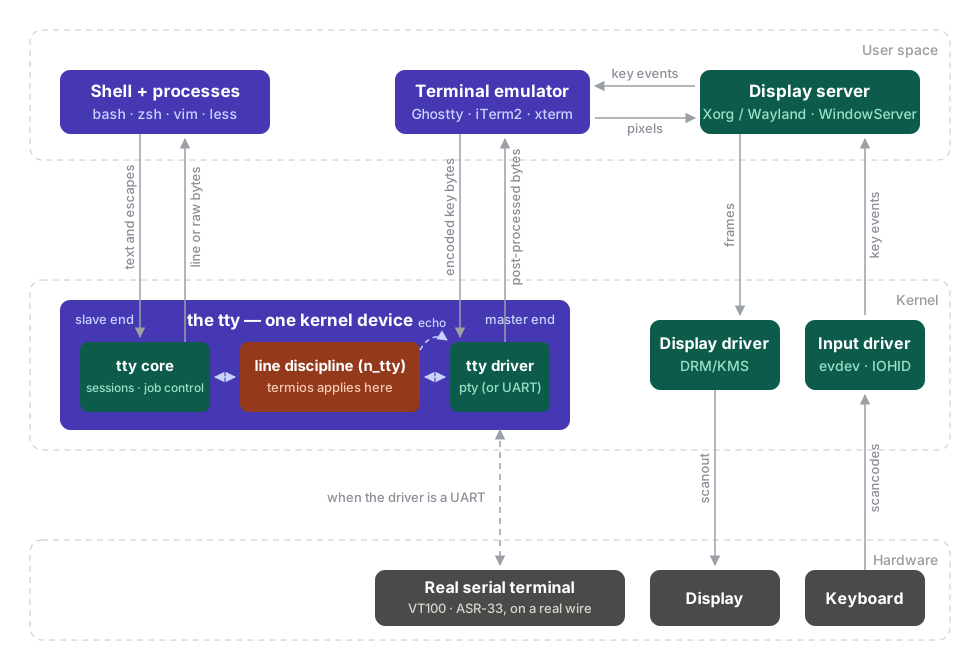
Follow your keypress in from the bottom right. The keyboard sends scancodes; the kernel’s input driver (evdev on Linux, IOHID on macOS) turns them into key events; the display server hands them to the focused window. Nothing so far is terminal business — every GUI program receives its keys this way.
The terminal business starts inside the terminal emulator — Ghostty, iTerm2,
xterm, Terminal.app. Its input half is an encoder: it
turns each key event into bytes and writes them down a file descriptor — the
master end of a pseudo-terminal. The encoder is where your Return key puts on
its disguise. A real VT100’s Return key put \r on the serial wire, so the
emulator, impersonating one, writes \r — the ^M from the opening. The
encoding rules are simple and old: printable keys go in as themselves; Ctrl
zeroes the high bits, so Ctrl-J is byte 10 (J is 74, 74 − 64 = 10); keys with
no byte of their own become escape sequences, \x1b[A for the up arrow. The
program at the far end never sees a key event. It sees only these bytes, on
one stream. (The emulator’s other half — the parser and screen model that
turn your program’s output back into glyphs — is a story for another post.)
The encoder’s bytes then cross the kernel: in at the pty’s master end,
through the line discipline — the editor-in-the-middle — and out at the
slave end, where your shell or program finally read()s them. The crossing is
where the rewrite happens. The discipline’s icrnl flag turns the encoder’s
\r into the \n your programs expect, and its sibling flags do the
echoing, the line buffering, the backspace, and the Ctrl-C. Everything this
post dismantles, and everything the puzzles rebuild, happens here, between
the two pty fds.
Output runs the mirror path. Your program writes to the slave fd, the
discipline gets one more pass — that’s how your \n becomes the \r\n a
terminal wants (onlcr, later) — and the emulator reads the result off the
master and draws it. Note who does what: the emulator encodes and draws but
never interprets your input; the kernel rewrites bytes but never draws; the
program just reads and writes an fd. When you see your own typing, that’s
the diagram’s dashed echo arc: the line discipline sending a copy of your
bytes back out the master — the emulator is drawing a reflection.
The dashed road down from the tty’s driver is the wiring all of this impersonates: swap the pty driver for a UART and a real VT100 hangs on the wire. The back half of this post opens the tty box up section by section.
One naming collision before the demos, because it has cost someone an
afternoon: the everyday word terminal points at the wrong actor. POSIX
calls this whole subject the General Terminal Interface, and its
terminal is the character device inside the kernel — the thing termios,
tcgetattr, isatty and stty are all named after. The program that draws
the glyphs — Ghostty, iTerm2, xterm — is a terminal emulator, and as far
as POSIX is concerned it doesn’t exist. In common speech the word has drifted
to mean the emulator, which is why careful writing (and this post) says
tty for the kernel device instead.3 So the “terminal” the first
line of this post told you to open is really a pair: an emulator drawing a
window in user space, and a tty — here a pty — answering it from inside the
kernel. Everyday speech names the pair with one word. The title accuses the
pair; the editor turns out to be the kernel half.
The config panel you already have
The line discipline’s entire state is a small struct the kernel keeps per
terminal. stty -a dumps it:
$ stty -a
speed 9600 baud; 24 rows; 80 columns;
lflags: icanon isig iexten echo echoe -echok echoke -echonl echoctl ...
iflags: icrnl ixon -ixoff ixany imaxbel iutf8 -ignbrk brkint ...
oflags: opost onlcr -oxtabs -onocr -onlret
cchars: eof = ^D; erase = ^?; intr = ^C; kill = ^U; ...
A name means the flag is on; a leading - means off. Three groups of
booleans (input, output, local) and a table of special characters. This one
screenful is your terminal’s behavior, and stty pokes it the same way a
program would through tcsetattr().
Before touching anything: your seatbelt is
$ stty sane
which puts everything back. If a demo goes sideways, type it blind and press
Enter. Worst case, press Ctrl-J instead of Enter — you’ll see why below.
Demo 1: who echoes your typing?
$ stty -echo; read line; echo "you typed: $line"; stty echo
Type something. Nothing appears — but press Enter and there it is. Your keystrokes were delivered the whole time; only the display was off, because displaying them was never your terminal app’s decision. The kernel was reading your input and writing it back at the screen, and you just told it to stop. Switching this one flag off is the entire implementation of every password prompt you’ve ever used.
Demo 2: the freeze
Press Ctrl-S. Now type ls and press Enter.
Nothing. The terminal is “hung” — the classic mystery freeze that has scared
decades of users into killing their sessions. Press Ctrl-Q: everything you
typed arrives at once, and the ls output with it.
This is software flow control. Ctrl-S (0x13) tells the kernel to hold all
output to the terminal; Ctrl-Q (0x11) releases it. Neither byte is ever
delivered to your program — the kernel eats them. It’s pacing for 1970s
teletypes that couldn’t print as fast as the wire could send, it is still on
by default in 2026, and it’s controlled by one flag:
$ stty -ixon
Now Ctrl-S is an ordinary byte. (Bash users get a bonus: Ctrl-S finally
reaches readline, where it’s forward history search — the mirror image of
Ctrl-R you could never press.)
Demo 3: Enter, unmasked
That ^M from the opening demo becomes visible everywhere once you turn off
the translation:
$ stty -icrnl; cat -v
Type hello and press Enter. Two strange things happen. You see hello^M on
the screen — and cat prints nothing back. Press Enter a few more times:
still nothing. Now press Ctrl-J, and cat finally answers with
hello^M^M^M.
Unpack it. The roundtrip showed where the ^M is
born: the emulator’s
encoder sends \r because a VT100’s Return key did. icrnl is the kernel
flag that rewrites that \r into \n on the way in. With it off, your \r
arrives as itself — that’s the ^M. But the line discipline also buffers
your typing until it sees a line delimiter, and the delimiter is \n, not
\r. With the translation off, nothing you can type with the Return key
ends a line anymore. Ctrl-J is a literal \n — byte 10, by the
roundtrip’s Ctrl arithmetic — so it still works. Your Enter key was never special; it was
one table lookup away from being an ordinary byte the whole time.
(Ctrl-C out of cat, then stty sane. And now you know the fine print on
the seatbelt: with -icrnl in effect, you must finish the blind stty sane
with Ctrl-J, because Enter can no longer submit it. Interactive shells
survive this — their line editors accept both bytes — but canonical-mode
programs like read and cat do not.)
Demo 4: Ctrl-C is not wired to anything
Signals feel like hardware — surely Ctrl-C is a special key? It’s a table
entry. Look at the cchars: line in stty -a: intr = ^C. Rebind it:
$ stty intr ^G
$ sleep 100
Press Ctrl-C. It echoes as ^C and nothing happens — it’s an ordinary byte
now, sitting in the input queue. Press Ctrl-G: interrupted. The kernel
compares every incoming byte against that table, and on a match it discards
the byte and sends SIGINT to the foreground process group instead. Change
the table, change the key. (stty sane restores ^C.)
There’s a deeper cut here — the interrupt character actually does two things, and you can switch off just one of them — but that needs a better instrument than our own terminal to see clearly.
Demo 5: Ctrl-C is aimed at a group
Nothing in stty -a explains this next one — that’s the point.
$ sleep 100 | sleep 100
Press Ctrl-C. Both sleeps die, not one. Demo 4 showed the kernel turning
your byte into SIGINT; this shows where the signal is aimed: not at a
process but at the terminal’s foreground process group. Your shell had put
both halves of the pipeline into one group before starting them — run the
pipeline again with & on the end, and ps -o pid,pgid,comm shows the two
PIDs sharing a PGID.
$ sleep 100 &
$ read line &
The first background job runs fine. The second stops on the spot — zsh
reports suspended (tty input) — because it tried to read from the terminal
while another group held the foreground, and the kernel sent it SIGTTIN
instead of your keystrokes. Bring it forward with fg and the same read
works. None of this lives in the flag struct; it’s a different kind of
bookkeeping, and the second half names the layer that keeps it.
Demo 6: your terminal is a file
$ tty
/dev/ttys003
That’s a real file (/dev/pts/0 on Linux). Open a second terminal window
and write to your first one:
$ echo 'hello from next door' > /dev/ttys003
The greeting appears in the first window, right in the middle of its prompt.
Nothing in the first window cooperated — not its shell, not its emulator.
The second shell wrote to a kernel device file, and whatever machinery sits
behind that file did the rest. (ls -l shows you own the file; this is how
wall and write deliver messages to your screen.)
The limit of poking your own terminal
And here is the problem with everything above: we’re standing on the stage we’re trying to inspect. Every demo tangles three actors — the terminal emulator drawing pixels, the kernel rewriting bytes, and the shell’s own line editor, which quietly reconfigures the terminal every time it draws a prompt. When something surprising happens, which one did it?
To answer that we need to hold both ends of the wire at once: type bytes in one side, and separately observe what comes out the other — what reached the screen, and what reached the program. That’s exactly what a pseudo-terminal gives you, it takes about fifteen lines of Python, and it turns every claim in this post into an assertion a test can check.
That rig is packaged as tty-puzzles: fifteen puzzles that take the terminal apart one flag at a time and then build it back, from switching off your first flag to a working prompt written from scratch. That’s where to get your hands dirty. The rest of this post is the map to keep open while you work — what the thing you’re dismantling actually is, and what its parts are named.
Three layers under one fd
To your program, a tty is just a file descriptor, the same interface as a
pipe or a socket — and the first thing a program can ask an fd is which of
those it is. isatty(fd) — an ioctl probe under the hood, [ -t 1 ] in
the shell — answers whether a terminal is on the other end; it’s how ls
decides between columns and one-per-line. What sits behind an fd that
answers yes is one kernel device built as three stacked layers:
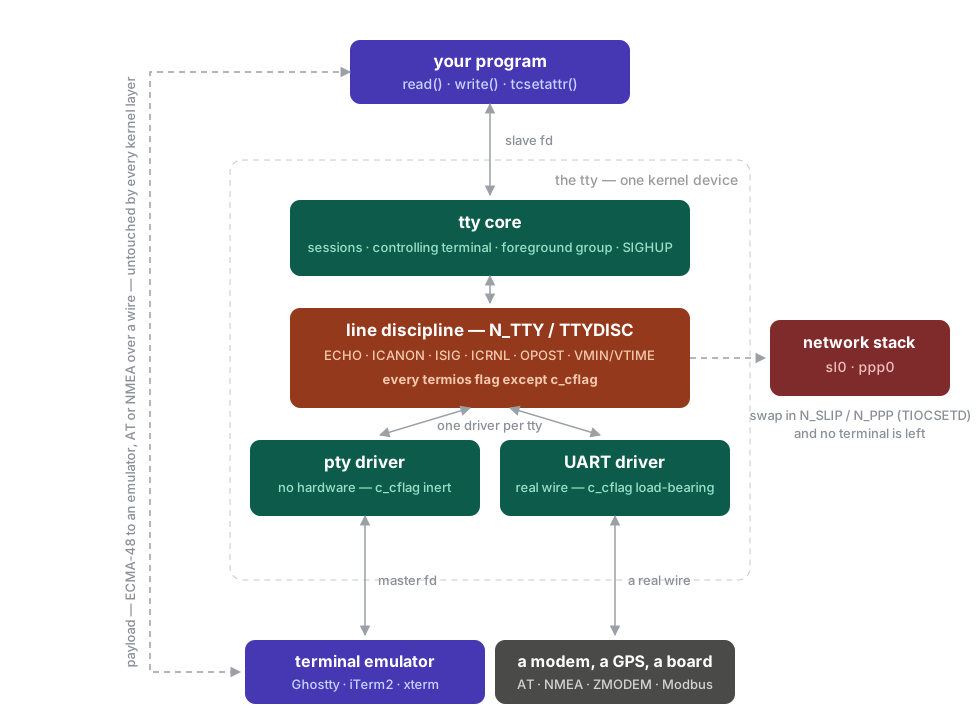
Only the bottom layer varies — a pty here, a UART when the wire is real. One core and one discipline serve every kind of terminal your machine has. Top to bottom:
The tty core (mostly skipped)
The tty core is the bookkeeping layer: it opens and closes the device,
tracks which session owns it and which process group is in the foreground, and
delivers SIGHUP when the far end disappears. Linux keeps it in
drivers/tty/tty_io.c.
That bookkeeping — job control — is a whole subject of its own, and this
post deliberately leaves most of it alone. The short version: a tty belongs
to a session, the session has one foreground process group at a time,
and that group is what demo 5 caught in the act. The discipline made one
SIGINT; the core aimed it at the whole foreground group, which your shell
re-points with tcsetpgrp every time you run a command. The core is also
what stopped demo 5’s backgrounded read — SIGTTIN for background reads
always, SIGTTOU for background writes if you set stty tostop — and it
sends SIGHUP to the session when the terminal disappears, the hangup
nohup exists to survive. All of that machinery — sessions, process groups,
fg/bg — deserves its own series, and Linus Åkesson’s The TTY
demystified already tells it
well.
The line discipline
The line discipline is the layer this post has been dismantling: echo,
canonical line editing, CR/NL translation, output post-processing, and turning
^C into SIGINT. Linux names the default one N_TTY; BSD and macOS say
TTYDISC. It knows nothing about the hardware below it, and it is the one
layer POSIX fully specifies: termios is its contract, and everything
stty -a printed is its state.
What it never does is interpret. The conversation the two endpoints hold — ECMA-48 escape sequences to an emulator, AT commands to a modem, NMEA from a GPS — is payload, agreed privately between them, and it rides through the discipline. The kernel only has to be told to stop mangling it on the way, which is what raw mode is. Every flag the puzzles switch off is the kernel getting out of the way of somebody else’s protocol.
Swapping the discipline is a different move. The discipline slot is
pluggable: ioctl(fd, TIOCSETD, N_SLIP) replaces N_TTY outright, and the fd
stops handing bytes to any reader — the kernel frames them into a network
interface (sl0) instead. N_PPP, N_HDLC and N_GSM do the same with
their own framing. This is the one sense of “a protocol over a tty” that does
not mean payload: ECMA-48 rides through the discipline; SLIP replaces it.
(The N_ prefix is the discipline’s number — small integers frozen as
userspace ABI, N_TTY being 0. The source files match: n_tty.c,
n_hdlc.c.) Note what stays fixed across every road in the diagram: the
program’s side is the same read(), write() and tcsetattr() whether the
far end is an emulator, a modem, or no reader at all.
The tty driver
The tty driver is the only layer that touches the far end: a serial/UART
driver, a pty, or the virtual console. A pty is simply a tty with no
hardware under it — the bottom driver loops back to another fd instead of
driving a UART, which is what lets a userspace emulator sit where a VT100 used
to. Demo 6 ran on exactly this: the /dev/ttys003 you wrote to is a pty
slave, and the emulator holding its master drew the greeting. Note the
asymmetry: the line discipline hangs off the slave side, where
the program reads. The master side is a raw byte hose — the emulator gets your
program’s output exactly as the discipline rewrote it, and its keystrokes are
fed into the discipline from the far side.
POSIX reaches down into this layer with exactly one field, and it hides a
good story. c_cflag — baud, character size, parity, stop bits — describes a
wire, and a pty has no wire. POSIX §11.2.4 therefore declines to say what
setting it does on one: it is “unspecified whether non-default values are
unsupported, or are supported and emulated in software,” or accepted and
ignored. In practice implementations take the third option: they store the
value, hand it back, and change nothing. The speed 9600 baud your stty -a
reports is a stored fiction — the speeds sit in the termios struct beside
the four flag fields, read back with cfgetispeed/cfgetospeed. Note how
narrow the clause is, though — c_iflag, c_oflag, c_lflag and c_cc are
fully specified on a pty, which is what makes every assertion in the puzzles
well-defined.
From here on, we stay inside the line discipline.
The modes and the flags
Now the modes. Two vocabularies are in play, and the confusion comes from
mixing them: colloquial mode names (cooked, raw, cbreak), which are
informal bundles of settings, and the termios flags (ICANON, ECHO,
ISIG, …), which are the individual bits the kernel actually checks. The
colloquial names are just named presets over the flags. A program reads the
live flags with tcgetattr and writes them back with tcsetattr, which
takes a when: TCSANOW applies immediately, TCSADRAIN once pending
output has drained, TCSAFLUSH that plus discarding unread input.
Cooked, raw, cbreak (and the cooking pun)
The metaphor comes from early Unix tty drivers. Think of input bytes as ingredients:
- raw4 — nothing is done to the bytes. No echo, no line buffering, no signal translation, no CR/LF mapping. The program sees exactly what was typed, byte by byte.
- cooked — the bytes are fully “prepared” by the line discipline before the program sees them: buffered into lines, echoed, edited, signal characters translated, CR↔NL mapped. This is the default.
- cbreak (“character break”) — the in-between. No line buffering, but echo and signals still on. Sometimes nicknamed rare mode — continuing the pun, it’s between raw and well-done. Roughly what an interactive line editor like readline sets up.
How the flags map back to the names — with each column read as the kind of program that wants it:
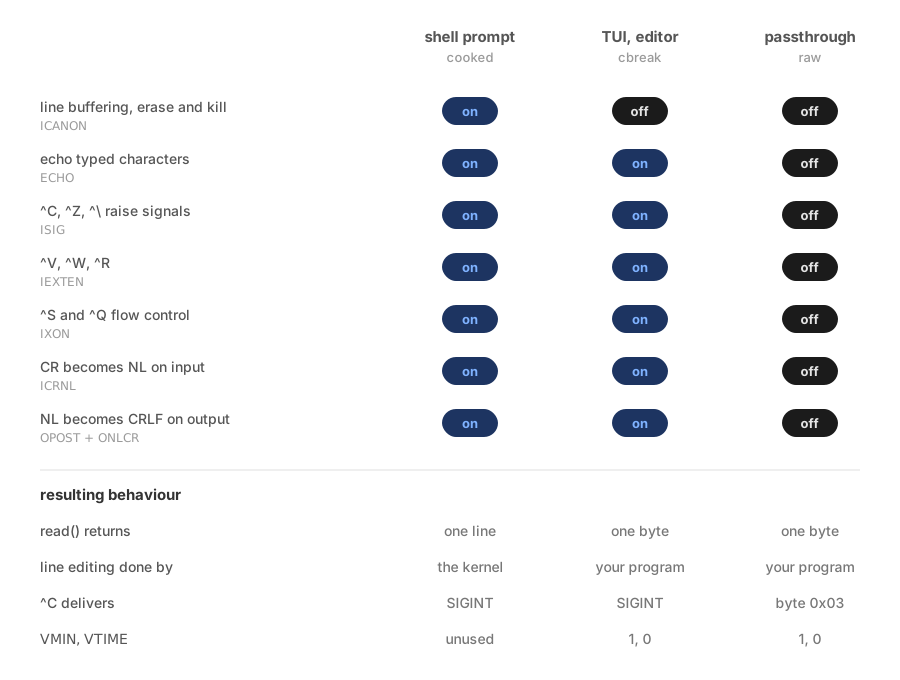
The three modes are strictly nested, so the matrix reads as a progressive
strip-down rather than three separate pipelines. The single most useful thing
in it: cbreak differs from cooked by exactly one flag. Clearing
ICANON5 moves the line-editing responsibility across the kernel
boundary into your process, and nothing else changes — ^C still works,
printf still emits proper CRLF, ^S still freezes you. That’s why cbreak
is the right default for an interactive program: keystroke-level input
without reimplementing the terminal’s civilized behavior.
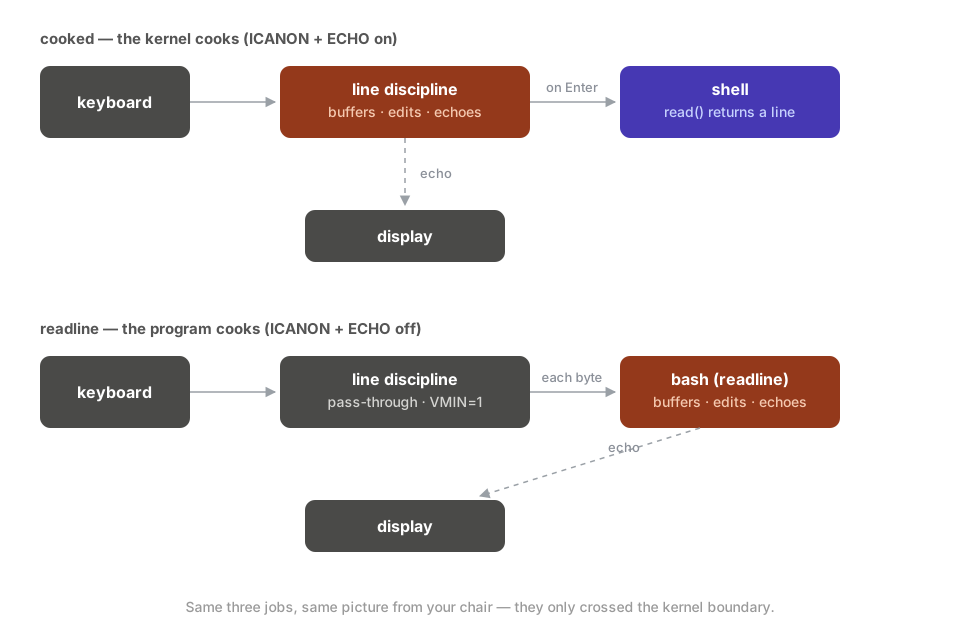
Your shell lives in that middle column. Cooked, the kernel owns all three
jobs — buffering, echoing, and the line editing you get for free (backspace,
^W, ^U). Readline’s opening move is to clear ICANON and ECHO and take
all three jobs for itself — bash’s line editing looks identical to the
kernel’s from your chair, but a different actor is doing it:
Raw is the row that surprises people, because it turns off things you may not
have meant to give up. OPOST off means your own \n no longer becomes CRLF,
so output staircases down the screen until you start writing \r\n yourself.
ISIG off means the process is unkillable from the keyboard — a raw-mode
program that hangs before restoring the tty is the classic reason for typing
stty sane blind.
The four fields and their flags
The flags live in four fields of struct termios, and the first letter of a
constant usually tells you which field — with one messy exception:
| Field | Meaning | Prefix | Examples |
|---|---|---|---|
c_iflag |
input byte processing | I |
ICRNL (CR→NL), IXON (Ctrl-S/Q flow control), ISTRIP (strip 8th bit) |
c_oflag |
output byte processing | O |
OPOST (the master output switch), ONLCR (NL→CR-NL — why terminals want \r\n) |
c_cflag |
control / hardware | C |
CSIZE/CS8, PARENB (parity), CSTOPB (stop bits), baud |
c_lflag |
local / high-level | (mixed) | ICANON, ECHO, ISIG, IEXTEN, NOFLSH, TOSTOP |
The mnemonic works cleanly for O and C, but I is ambiguous:
ICRNL/IXON/ISTRIP are input flags, yet ICANON/ISIG/IEXTEN are
local flags. Don’t trust the I prefix to mean “input.”
The c_lflag entries are the stars of this whole subject:
ICANON— “canonical”: line-buffered input plus ERASE/KILL editing.ECHO— write typed characters back at the screen.ECHOE— make ERASE visually backspace-space-backspace.ISIG— turnVINTR→SIGINT,VSUSP→SIGTSTP,VQUIT→SIGQUIT.IEXTEN— the implementation-defined annex (Ctrl-V literal-next, Ctrl-O discard, Ctrl-W word-erase, Ctrl-R reprint).
The fields aren’t just namespaces — on the input side they’re stages, and the flags apply in a fixed order as a byte travels up from the driver:
driver → break/parity handling → ISTRIP → IXON → ISIG
       → IGNCR/ICRNL/INLCR → ICANON editing + ECHO → your read()
The order occasionally matters. Signal matching runs before canonical
buffering, which is why Ctrl-C works mid-line without waiting for Enter —
and flow control matches before everything, which is why demo 2’s Ctrl-S
never reached your program at all.
The control characters
A separate array, c_cc[], maps which byte triggers each special function.
The constants all start with V because they’re indices into that array:
| Constant | Function | Default key |
|---|---|---|
VINTR |
interrupt → SIGINT |
Ctrl-C |
VQUIT |
quit → SIGQUIT |
Ctrl-\ |
VERASE |
erase one char | Backspace/DEL |
VKILL |
erase whole line | Ctrl-U |
VWERASE |
erase one word | Ctrl-W |
VEOF |
end-of-file | Ctrl-D |
VSUSP |
suspend → SIGTSTP |
Ctrl-Z |
VSTART/VSTOP |
flow control | Ctrl-Q / Ctrl-S |
VMIN/VTIME |
non-canonical read: min bytes / timeout | — |
When you change “the backspace key,” you’re setting c_cc[VERASE].
VMIN/VTIME are the odd ones out: not keys but the knobs governing when
read() returns once you’ve left canonical mode. POSIX gives VTIME 0.1
second granularity; VMIN=1, VTIME=0 means “return as soon as one byte
exists, never time out.”
Further reading
One question remains that nothing in this post can answer: what can the thing on the far end of the wire draw, and which bytes drive it? The kernel doesn’t know — it never interprets the payload. That question belongs to the other half of the system — the emulator’s parser, its screen model, and the escape-sequence language they speak — and it gets a post of its own. Until then, the companions:
- Linus Åkesson, The TTY demystified — the classic tour of the whole subsystem, including the job-control half this post leaves out.
- Nelson Elhage, A brief introduction to termios — three short posts, the same territory as this one from a different angle.
- Viacheslav Biriukov, Terminals and pseudoterminals — a chapter of a free book on fds, pipes and sessions.
- Ishuah Kariuki, Understanding the Linux tty subsystem — the three kernel layers, from the Linux source’s point of view.
- Rachid Koucha, Using pseudo-terminals —
pty programming in C, the
openptymachinery in detail. - Vasiliy Kevroletin, How terminal works — a whole-stack walkthrough, emulator to shell.
- Brian Will, Unix terminals and shells — a lecture series, if you’d rather watch this material than read it.
Footnotes
-
Strictly, the thing you’re opening is a terminal emulator — Ghostty, iTerm2, xterm. The everyday word “terminal” bundles it with a second actor: a kernel structure that does a startling amount of work of its own. Taking that pair apart is what this post is about. ↩
-
^Mis caret notation:^Xstands for the control byte thatCtrl-Xproduces, so^Mis Ctrl-M — byte 13,\r. It reached the screen becauseCtrl-Vmeans “take the next byte literally, don’t interpret it.” Both the kernel and your shell’s line editor honor it, which is why the\rsurvived long enough to be displayed. ↩ -
tty is short for teletypewriter — the ASR-33 and its relatives that the interface was built for. The hardware is gone; the name and the API survive. A console is yet another thing: the machine’s own primary terminal,
/dev/consoleand the virtual consoles behind Ctrl-Alt-F2. People use it as a synonym for the emulator. It isn’t one. ↩ -
A warning about the word: “raw” is a nickname, not a specification — three widely-used definitions disagree. libc’s
cfmakeraw()clearsECHO,OPOST,ISIG,ICANON,IEXTENand all input translation, and forcesCS8— but it leavesVMIN/VTIMEas it found them, so a tty someone else configured can hand you a raw mode that blocks forever.stty rawclears the same flags but leavesECHOon, and does setmin 1 time 0. ncursesraw()clears onlyICANON,ISIGandIXON, leavingOPOSTandECHOon — closer to cbreak than tocfmakeraw(). When it matters, spell out the flags. ↩ -
ICANONis the one mode name POSIX makes formal: set, the tty is in canonical mode — input is assembled into lines,read()returns only complete lines, the discipline handles ERASE/KILL editing; cleared, it is non-canonical, andVMIN/VTIMEdecide whenread()returns. The kitchen words never made it into the standard — “cooked” is canonical plus echo plus signals plus output processing, a bundle POSIX has no name for. ↩